GPU Virtualization Principles
In AI inference scenarios, a common dilemma is that GPUs are expensive, but mostly idle.
A typical inference service often only uses 20%~40% of the GPU's compute and a small amount of VRAM, leaving the rest idle. Kubernetes' default GPU scheduling model is exclusive: nvidia.com/gpu: 1 means the entire card is yours, and all other Pods must wait. Want to share a single GPU across multiple inference services? The standard Device Plugin can't do it, because it can only report device counts (integers) to the scheduler — there is no concept of "VRAM quota."
This led to various GPU sharing solutions. NVIDIA's official Time-Slicing allows multiple Pods to be scheduled concurrently, but provides no VRAM isolation — a Pod OOM can crash all tasks on the card. MIG hardware partitioning offers true isolation, but only datacenter-grade cards like A100 and H100 support it.
HAMi takes a different approach: no driver changes, no application changes — it achieves GPU virtualization at the software layer through CUDA API interception. Multiple Pods share the same physical GPU, and each Pod can only "see" the VRAM it requested. Over-allocation directly returns OOM. HAMi is a CNCF Sandbox project, formerly known as k8s-vGPU-scheduler.
This article starts with the fundamentals of Kubernetes GPU scheduling, explains the limitations of the default model, and then dives into HAMi's architecture and implementation to show how it works around these constraints.
Kubernetes GPU Scheduling Fundamentals
Device Plugin
Kubernetes does not natively manage GPU or other heterogeneous hardware resources. To address this, Kubernetes provides the Device Plugin extension mechanism, which allows hardware vendors to register custom device resources with Kubelet for use by the scheduler.
A Device Plugin itself is deployed as a DaemonSet, running on each GPU node. It is responsible for registering devices with Kubelet, reporting resources, and responding to allocation requests. The following diagram shows the complete sequence from Device Plugin startup to GPU Pod execution:
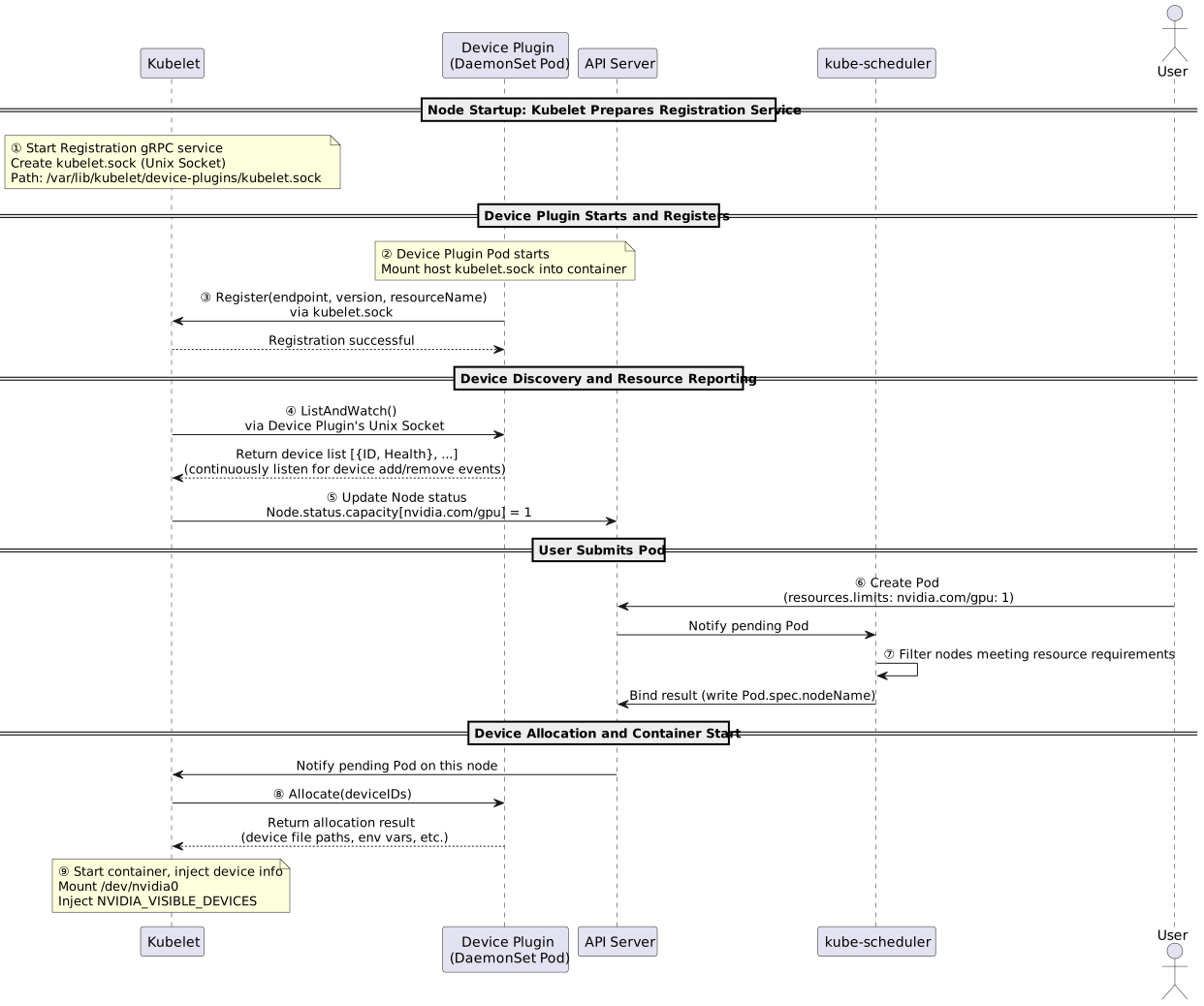
Each step is explained below:
| Step | Participant | Description |
|---|---|---|
| ① | Kubelet | Creates the Registration gRPC service on startup, listening on kubelet.sock, waiting for Device Plugin registration |
| ② | Device Plugin | The DaemonSet Pod starts, mounting the host's kubelet.sock into the container as the communication entry point with Kubelet |
| ③ | Device Plugin → Kubelet | Calls the Register interface via kubelet.sock, reporting its Unix Socket path, API version, and resource name (e.g., nvidia.com/gpu) |
| ④ | Kubelet → Device Plugin | After successful registration, Kubelet calls ListAndWatch via the Device Plugin's Unix Socket to get the current node's device list, and continuously listens for device add/remove events |
| ⑤ | Kubelet → API Server | Syncs the discovered device count to the API Server, reflected in Node.status.capacity (e.g., nvidia.com/gpu: 1) |
| ⑥ | User → API Server | User submits a Pod declaring nvidia.com/gpu: 1 resource requirements |
| ⑦ | kube-scheduler | Reads Node resource information from the API Server, filters qualifying nodes, and binds the Pod to the target node (writes Pod.spec.nodeName) |
| ⑧ | Kubelet → Device Plugin | The target node's Kubelet detects a Pod pending startup and calls the Device Plugin's Allocate interface, passing the device IDs to be allocated |
| ⑨ | Device Plugin → Kubelet | Returns specific device file paths (e.g., /dev/nvidia0) and environment variables (NVIDIA_VISIBLE_DEVICES, etc.). Kubelet injects them into the container and starts it |
Device Plugin has a fundamental limitation: the ListAndWatch interface can only report device counts (integers). The scheduler has no visibility into device-specific attributes: VRAM size, model, NUMA topology. This is why HAMi has to use Node Annotations to pass GPU specifications.
DRA (Dynamic Resource Allocation)
DRA is Kubernetes' next-generation solution for this, promoted to GA in v1.34. It introduces a new set of APIs:
ResourceClaim: A Pod's declaration to claim device resources, analogous to how a PVC claims a PVDeviceClass: Describes device specifications and filtering criteria for a class of devices, supporting CEL expressions for fine-grained matching (e.g., "VRAM ≥ 16GB and model is A100")ResourceSlice: The list of available devices reported by the device driver to the API Server, carrying complete attributes
The scheduler can directly read device attributes from ResourceSlice for scheduling decisions. DRA also natively supports multiple Pods sharing the same device and cross-container device topology alignment.
HAMi currently remains based on Device Plugin, but the official team has launched the HAMi-DRA subproject (v0.1.0, requires Kubernetes 1.34+), which converts HAMi's GPU resource requests into DRA ResourceClaim via MutatingWebhook, serving as a transitional solution for migrating to DRA.
HAMi Virtual GPU Scheduling Principles
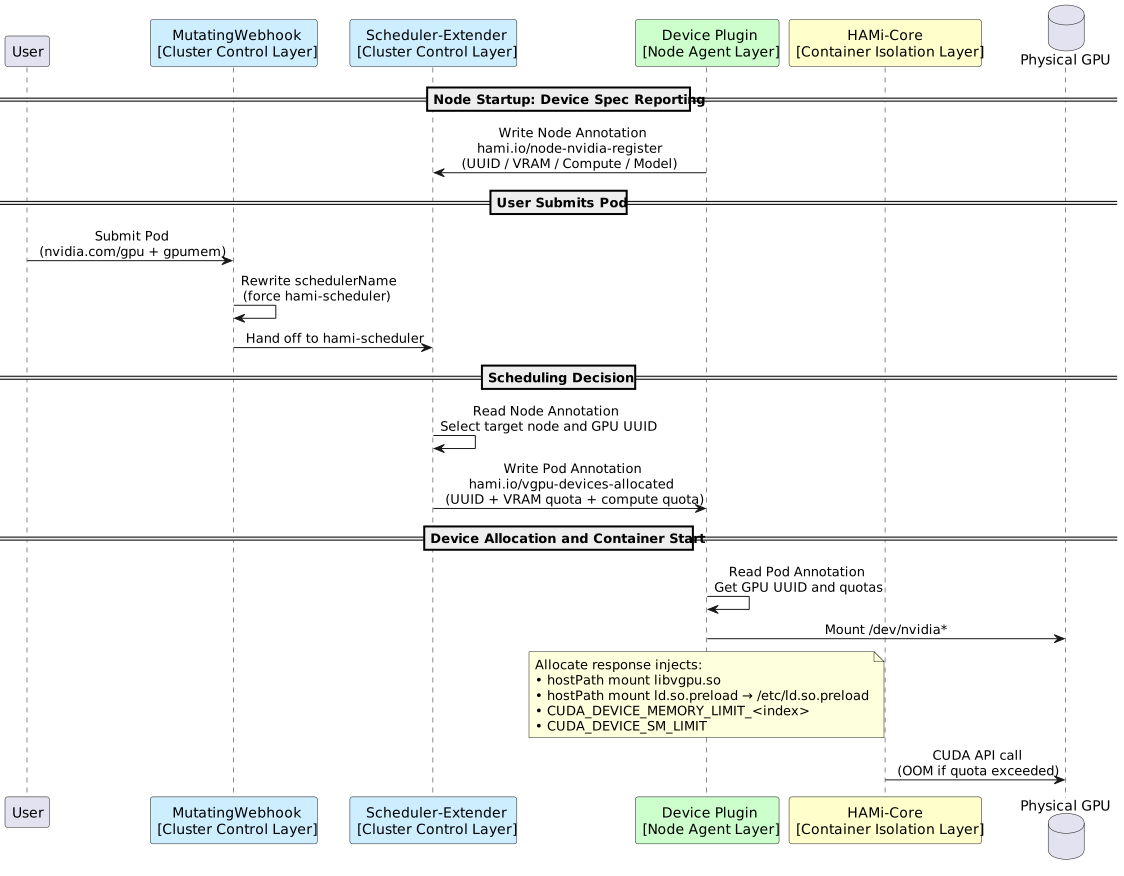
HAMi leverages three Kubernetes extension mechanisms simultaneously (MutatingWebhook, Scheduler Extender, and Device Plugin), each with its own responsibility:
- Fine-grained resource declaration: Users can declare
nvidia.com/gpumem(VRAM in MiB) andnvidia.com/gpucores(compute %) - Resource-aware scheduling: The Scheduler-Extender reads GPU specifications from Node Annotations, performing Filter and Bind based on remaining VRAM/compute capacity
- In-container isolation:
libvgpu.sointercepts at the CUDA API layer, enforcing hard limits on the container's actual VRAM and compute usage
Architecture and Core Components
HAMi consists of four core components:
| Component | Type | Responsibility |
|---|---|---|
HAMi MutatingWebhook Server | Deployment (embedded in hami-scheduler Pod) | Admission entry point: scans Pod resource fields, rewrites schedulerName to hami-scheduler for Pods that need HAMi scheduling (configurable); Pods with explicitly specified schedulerName are skipped |
HAMi Scheduler-Extender | Deployment (embedded in hami-scheduler Pod) | Scheduling core: maintains a global GPU view, implements fine-grained VRAM/compute-aware scheduling during Filter/Bind phases, supports binpack/spread strategies |
HAMi Device Plugin | DaemonSet | Node resource layer: registers virtual GPU resources with Kubelet; mounts libvgpu.so and ld.so.preload into containers via hostPath during Allocate, and injects environment variables such as CUDA_DEVICE_MEMORY_LIMIT_<index> and CUDA_DEVICE_SM_LIMIT |
HAMi-Core (libvgpu.so) | Dynamic library (injected during Device Plugin Allocate) | In-container soft isolation: overrides dlsym to hijack NVIDIA library functions starting with cu/nvml, implementing VRAM limit interception and compute throttling |
After deployment, the Pod status looks like this:
$ kubectl -n hami-system get pod
NAME                              READY   STATUS    RESTARTS   AGE
hami-device-plugin-5gn6j          2/2     Running   0          25h   ← GPU node 1 (node agent layer)
hami-device-plugin-qzc78          2/2     Running   0          29h   ← GPU node 2 (node agent layer)
hami-scheduler-8647f67d84-zr42b   2/2     Running   0          29h   ← Scheduling control layer (globally unique)
The following diagram shows the three-layer architecture's component composition and communication:
Workflow in Detail
Step 1: Device Registration and Resource Reporting
After hami-device-plugin starts, it does two things:
① Inflating GPU Count to Kubelet
It inflates 1 physical GPU into N logical GPU resources (default 10), making kube-scheduler believe the node has 10 GPUs available for allocation:
# Allocatable resources in kubectl get node <gpu-node> -o yaml
nvidia.com/gpu: "10"   # Originally 1 card, inflated to 10
② Writing Device Specifications to Node Annotations
The standard Device Plugin's ListAndWatch interface can only report device counts (integers), unable to carry VRAM size, UUID, compute, and other detailed specifications. HAMi's solution is to additionally write this information into Node Annotations for hami-scheduler to read:
| Annotation | Purpose |
|---|---|
hami.io/node-nvidia-register | Device specification list (UUID, inflated count, VRAM, compute, model, NUMA node, health status) |
Field format (JSON array, one object per GPU):
# Example for a node with 2x 32GB V100
hami.io/node-nvidia-register: '[
  {"id":"GPU-00552014-...","count":10,"devmem":32768,"devcore":100,"type":"NVIDIA-Tesla V100-PCIE-32GB","numa":0,"health":true},
  {"id":"GPU-0fc3eda5-...","count":10,"devmem":32768,"devcore":100,"type":"NVIDIA-Tesla V100-PCIE-32GB","numa":0,"health":true}
]'
Field descriptions: id is the GPU UUID, count is the inflated logical count, devmem is VRAM (MiB), devcore is compute (%), numa is the NUMA node number, and health is the health status.
After hami-scheduler starts, it continuously Watches this Annotation on all GPU nodes, maintaining a global GPU resource view.
Step 2: Scheduling Decision
When users submit a Pod, they declare fine-grained resource requirements:
resources:
  limits:
    nvidia.com/gpu: 1          # Request 1 logical GPU slot
    nvidia.com/gpumem: 1024    # Request 1024 MiB VRAM
    nvidia.com/gpucores: 30    # Request 30% compute (optional)
As a kube-scheduler extender, hami-scheduler intervenes during the standard scheduling flow's Filter and Bind phases:
- Filter: Reads Node Annotations, checking whether the target node has sufficient remaining VRAM (
sum of allocated VRAM + current request ≤ total physical VRAM) - Bind: Selects a specific physical GPU UUID and writes the allocation result to the Pod Annotation
Scheduling results are passed to Device Plugin via Pod Annotations:
In the standard Kubernetes scheduling flow, kube-scheduler only passes device UUIDs to the device-plugin during the Bind phase, without carrying VRAM or compute information. Therefore, HAMi defines the following Pod Annotations as the communication protocol between the scheduler and device-plugin:
| Annotation | Content |
|---|---|
hami.io/bind-time | Scheduling timestamp (Unix time), used by device-plugin for timeout detection |
hami.io/vgpu-devices-allocated | List of allocated devices (UUID + vendor + VRAM MiB + compute%), retained as a record after completion |
hami.io/vgpu-devices-to-allocate | List of devices to allocate, initially identical to allocated; device-plugin removes each entry upon successful mount, set to empty when all are removed, indicating allocation is complete |
Example Annotation for a Pod requesting 3000 MiB of VRAM after successful execution:
hami.io/bind-time: 1716199325
hami.io/vgpu-devices-allocated: GPU-0fc3eda5-e98b-a25b-5b0d-cf5c855d1448,NVIDIA,3000,0:;
hami.io/vgpu-devices-to-allocate: ;    ← Already empty, device allocation complete
Step 3: Device Injection and Library Hijacking
After the Pod is scheduled to the target node, Kubelet calls the Device Plugin's Allocate interface. The Device Plugin completes four things in its response:
- Mount device files: Injects device files such as
/dev/nvidia*into the container - hostPath mount libvgpu.so: Mounts
libvgpu.sofrom the host (default path/usr/local/vgpu/libvgpu.so) into the container at the same path via hostPath - hostPath mount ld.so.preload: Mounts
/usr/local/vgpu/ld.so.preloadfrom the host into the container at/etc/ld.so.preload. This file contains a single line:/usr/local/vgpu/libvgpu.so. The Linux dynamic linker reads/etc/ld.so.preloadwhen any process starts inside the container and loads the listed libraries first, achieving the same effect asLD_PRELOADwithout modifying any environment variables. It takes effect transparently for all processes in the container. If the container setsCUDA_DISABLE_CONTROL=true, this mount is skipped and isolation is disabled - Inject environment variables:
CUDA_DEVICE_MEMORY_LIMIT_<index>=<number>m: Per-device VRAM quota, whereindexis the container's device index (0, 1, 2...), with a unit suffixm(e.g.,1024m), derived from the Pod'snvidia.com/gpumemrequestCUDA_DEVICE_SM_LIMIT=<percentage>: Compute quota ceiling (from the Pod'snvidia.com/gpucoresrequest)
After the container starts, libvgpu.so hijacks NVIDIA dynamic library symbol resolution by overriding the dlsym function, intercepting all function calls starting with cu and nvml:
VRAM Limit:
- Intercepts
nvmlDeviceGetMemoryInfo/nvmlDeviceGetMemoryInfo_v2: Makesnvidia-smionly display the quota value set byCUDA_DEVICE_MEMORY_LIMIT_<index>, rather than the total physical VRAM - Intercepts VRAM allocation functions such as
cuMemAlloc_v2/cuMemAllocManaged/cuMemAllocHost_v2: Performs OOM check before allocation — if the Pod's current VRAM usage + current request >CUDA_DEVICE_MEMORY_LIMIT_<index>, it directly returnsCUDA_ERROR_OUT_OF_MEMORY, preventing over-allocation
Core Limit:
- Intercepts Kernel submission functions such as
cuLaunchKernel/cuLaunchKernelEx: Callsrate_limiterbefore each submission, consuming the global counterg_cur_cuda_coresin units of the kernel's grid count; when the counter is exhausted (< 0), the current call enters a spin-wait (nanosleep) - Counter replenishment is handled by a background utilization watcher thread: this thread periodically samples actual GPU utilization, dynamically calculates the replenishment amount via the
delta()function, replenishes quickly when utilization is below quota, and reduces replenishment when above quota, converging the container's overall compute usage to within the percentage set byCUDA_DEVICE_SM_LIMIT
With this, the complete lifecycle of a GPU Pod is fulfilled: the Webhook handles the entry point, the Scheduler Extender selects the card, the Device Plugin handles injection, and HAMi-Core enforces boundaries inside the container.
HAMi Scheduling Strategies in Detail
HAMi's scheduling strategies operate on two independent dimensions: which node to select (node-scheduler-policy) and which card within the node (gpu-scheduler-policy). Each dimension can be configured as binpack (consolidate) or spread (disperse). Global defaults are set in values.yaml, and can be overridden per Pod via Annotations:
# Helm global configuration
scheduler:
  defaultSchedulerPolicy:
    nodeSchedulerPolicy: binpack
    gpuSchedulerPolicy: spread

# Pod-level override
metadata:
  annotations:
    hami.io/node-scheduler-policy: "spread"
    hami.io/gpu-scheduler-policy: "binpack"
Node Scheduling Strategy
The scheduler calculates a composite score for each node (based on currently used resources, excluding the current request):
Node Score = (Used Devices / Total Devices + Used Compute / Total Compute + Used VRAM / Total VRAM) × 10
Assume a cluster with 2 nodes, each with 4 GPUs, each at 100% total compute and 8192 MiB total VRAM (per-node totals: 400% compute, 32768 MiB VRAM). Node 1 has 3 GPUs used, 240% compute used, 20480 MiB VRAM used; Node 2 has 2 GPUs used, 120% compute used, 8192 MiB VRAM used:
Node 1 Score = (3/4 + 240/400 + 20480/32768) × 10 = 19.75
Node 2 Score = (2/4 + 120/400 + 8192/32768)  × 10 = 10.50
Binpack selects the higher-scoring node, prioritizing filling up more heavily loaded nodes and leaving empty nodes with complete resources — suitable for scenarios where you want to free up an entire machine for training tasks. Both Pods would be scheduled to Node 1. Spread selects the lower-scoring node, dispersing tasks — suitable for online inference horizontal scaling. Pod 1 would be scheduled to Node 2, Pod 2 to Node 1.
GPU Card Scheduling Strategy
Within the same node, the scheduler calculates a score for each card (including the current request):
GPU Score = ((Request Count + Used Count) / Total Slots + (Request Core + Used Core) / Total Core + (Request VRAM + Used VRAM) / Total VRAM) × 10
Assume within a node, GPU1 has 2 slots occupied, core 10%, VRAM 2000 MiB; GPU2 has 6 slots occupied, core 70%, VRAM 6000 MiB. Total slots 10, total VRAM 8000 MiB. Current request: 1 slot, core 20%, VRAM 1000 MiB:
GPU1 Score = ((1+2)/10 + (20+10)/100 + (1000+2000)/8000) × 10 = 9.75
GPU2 Score = ((1+6)/10 + (20+70)/100 + (1000+6000)/8000) × 10 = 24.75
Binpack selects the higher-scoring card (GPU2), packing multiple Pods onto the same already-loaded card, leaving GPU1 free for exclusive tasks. Spread selects the lower-scoring card (GPU1), reducing per-card contention pressure — suitable for latency-sensitive inference services.
The two dimensions are orthogonal. Common combinations:
| Node Strategy | GPU Strategy | Typical Scenario |
|---|---|---|
| Binpack | Binpack | Resource consolidation, freeing up entire machines for large tasks |
| Binpack | Spread | Node consolidation, inter-card isolation |
| Spread | Binpack | Cross-node high availability, intra-node consolidation |
| Spread | Spread | Maximum dispersion, maximum fault tolerance |
What's Next
Here are some recommended next steps:
- Learn about HAMi's architecture
- Install HAMi in your Kubernetes cluster
